Fix inverted <> and @# keys on a french Mac keyboard on Linux (Gnome)
At home, I'm often switching between the MacBook I use for work, my own M1 Mac Mini, and my Linux daily driver. With my Logitech bluetooth Mac keyboard I can easily switch between three paired devices, so it's very convenient for me to use this keyboard, including with my Linux machine.
On Gnome and KDE it's easy to add and configure keyboards (if you don't see the mac keyboard, you'll probably need to install gnome tweaks), the problem is the one mentioned in the title : the correct layout is pictured below, but the keys in red are inverted on Linux (at least in Gnome):
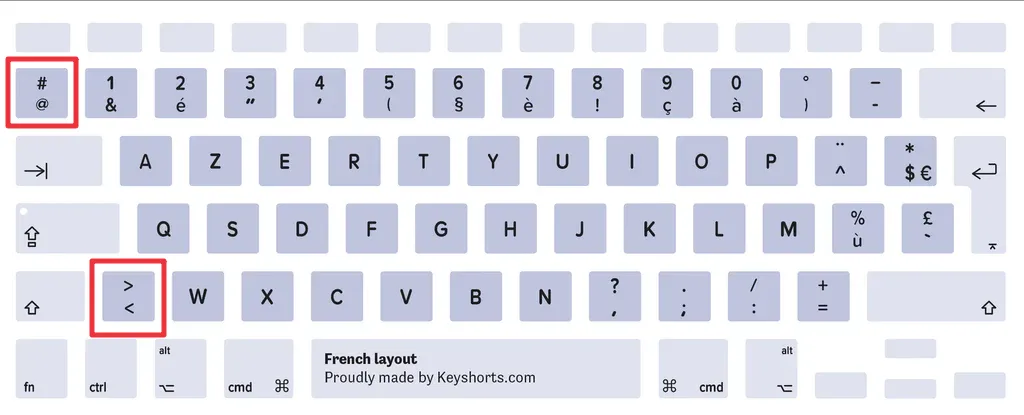
I don't know why, as I did not find any other french keyboard matching the inverted layout, and the only solution I found is to remap these keys with keyd. Here is the configuration file (/etc/keyd/default.conf) to invert back the keys and match correctly the keyboard layout:
                [ids]
                *

                [main]
                102nd = `
                ` = 102nd